Answered

Initial Filter Validation

Hello,

Just got a new requirement for a complicated initial filter validation page.

the requirement is: to allow a user to proceed in a mortgage process if the following conditions are met:

the required amount financing rate is not bigger than % of the property value, regarding an age table:

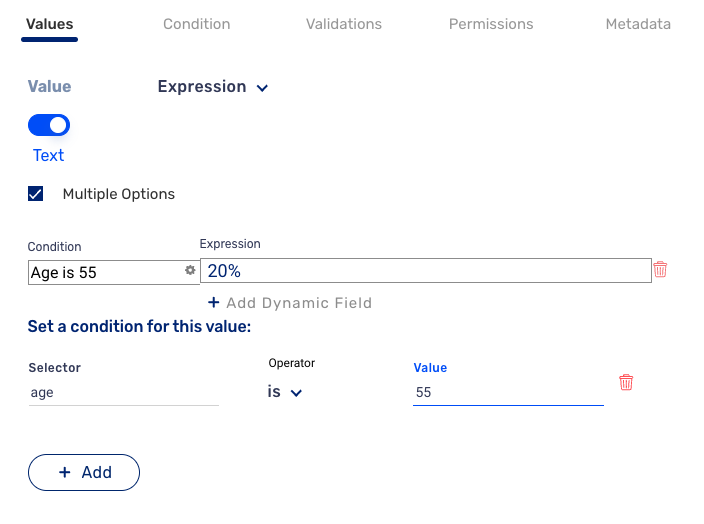
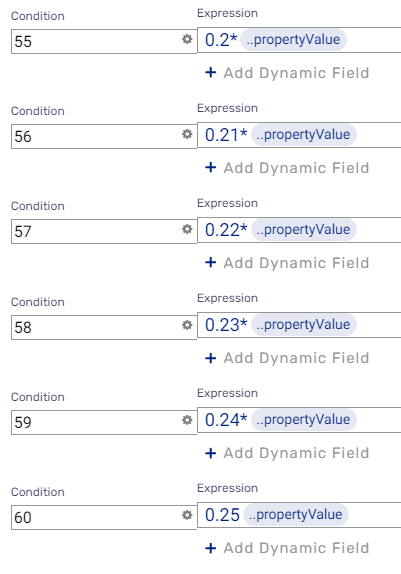
for example: if the age of the borrower is 55, i can allow a Max financing rate of 20%

if he's 56, i can allow a Max financing rate of 21%.

what's the best way to implement this? i got 36 more ages :(


0

Didn't find what you were looking for?

New post

Comments

5 comments

  • Official comment

    Hi Erez Granot,

    There are 3 ways to implement this:

    1. Using multi-expressions, where each line representsa different age. This is the safest way but it's also more time-consuming. (See example for one line)
    2. Using a formula with nested IF functions. You can refer to this document to learn more about the function: link.
    3. Using code - but for this, you need to know how to use JS.

    Let me know which approach you choose.

    Good luck!

  • Hi,

    its not as simple as that.

    i need the result not as an expression. 

    and the 20% is not the result i need, its a variable in the equation.

    if the required amount is 1,000,000 $ and the property value is 2,000,000 $, the financing rate is 50% but if the client age is 55 i need to stop him from progressing and show him a validation massage that the max financing rate is 20% for him to lower the required amount or up the property value

    0
  • If so, you know how to do the first part... You can implement the restriction using validation or a simple condition. If you need further clarification, feel free to open a ticket to our support team; they will be happy to assist :)

    0
  • i did it!

    i used a multi expression loanDetails.financingRateAge:

     
    with this formula loanDetails.maxFinancingRate:
    GREATER_THAN_EQUAL($loanDetails.financingRateAge, $loanDetails.requestedAmount)


    1
  • You can also attempt using custom validation. See the example below:
    const table = {
    "10": 20,
    "11": 21,
    };
    const age = 20 // Input
    const percent = '10' // Input
    return percent <= table[age];

    1

Please sign in to leave a comment.