
Hey Builders Community!
We are excited to announce a new feature that gives you more control over updates to your digital processes. Until now, when you made changes to a digital process and deployed them to the production server, those changes were automatically applied to live transactions—transactions that customers had started but not completed.
With this new feature, you now have the option to choose whether to apply changes to live transactions or only to new ones. This functionality helps prevent disruptions in complex and lengthy processes that customers may need weeks to complete, thereby minimizing potential business impacts.
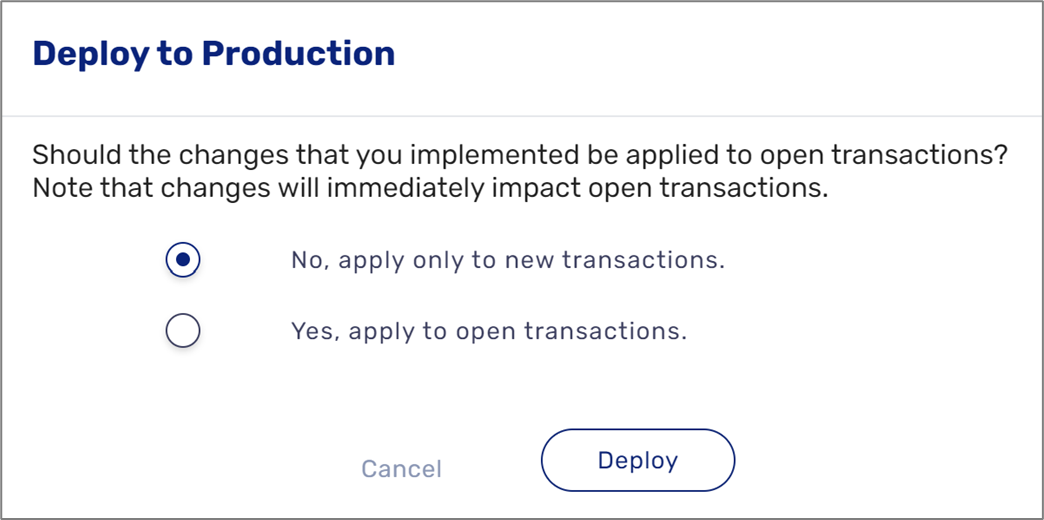
Before deployment, you will see a new prompt asking whether to apply the changes to existing open transactions or to apply them only to new transactions. This allows you to select the option that best suits your needs.
We are excited to announce a new feature that gives you more control over updates to your digital processes. Until now, when you made changes to a digital process and deployed them to the production server, those changes were automatically applied to live transactions—transactions that customers had started but not completed.
With this new feature, you now have the option to choose whether to apply changes to live transactions or only to new ones. This functionality helps prevent disruptions in complex and lengthy processes that customers may need weeks to complete, thereby minimizing potential business impacts.
Before deployment, you will see a new prompt asking whether to apply the changes to existing open transactions or to apply them only to new transactions. This allows you to select the option that best suits your needs.
If you are on our auto-upgrade plan, you already have access to this functionality. If not, and you would like to activate it, please open a support ticket to coordinate a version upgrade.
By default, we recommend always choosing the "No, apply only to new transactions" option unless you have a specific reason to apply the changes to live transactions—such as needing to quickly fix a mistake that was accidentally deployed to production. If you have additional questions, feel free to reach out to me.
We hope this new feature enhances your workflow and provides greater flexibility.
By default, we recommend always choosing the "No, apply only to new transactions" option unless you have a specific reason to apply the changes to live transactions—such as needing to quickly fix a mistake that was accidentally deployed to production. If you have additional questions, feel free to reach out to me.
We hope this new feature enhances your workflow and provides greater flexibility.
Best regards,
The EasySend team
0
Comments
0 comments